

How To Get Past A Administrator Password Windows 10
How to bypass Windows password without resetting or changing the electric current countersign
Have yous forgotten the administrator countersign and demand to login to Windows without changing or deleting the current password? A brute-force attack could be performed to find out your password but that is the nigh fourth dimension consuming approach. In this tutorial we'll show you 3 elementary way to quickly bypass Windows 10/8/7/Vista/XP password without irresolute or resetting the password.
Method ane: Create a New Admin Account without Logging in
Resetting a forgotten password tin can crusade the loss of EFS encrypted files and stored credentials that are encrypted with the old password. If you desire to admission a locked PC without modifying any existing user, the all-time way is to create a new admin account before logging in to Windows. This method is too useful when your user profile is corrupted or no user shown at the login screen.
-
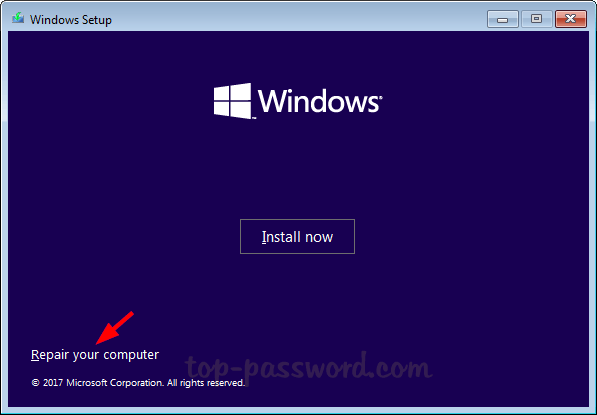
Boot from Windows installation DVD. When the Install Windows screen appears, click "Repair your computer" at the bottom left.
-
If you are using a Windows x/8 install deejay, select Troubleshoot > Advanced Options > Command Prompt.
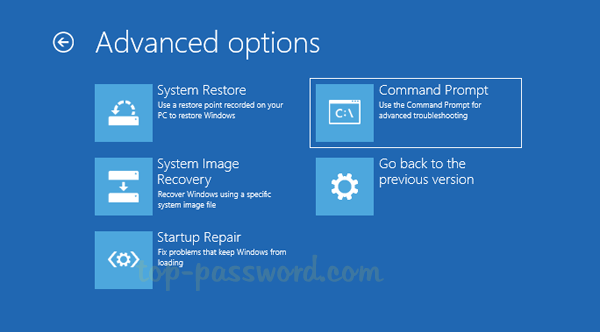
If yous are using a Windows seven install disk, click Command Prompt under System Recovery Options.
-
When you see a Command Prompt, type the following commands and press Enter.
copy d:\windows\system32\sethc.exe d:\ re-create /y d:\windows\system32\cmd.exe d:\windows\system32\sethc.exe
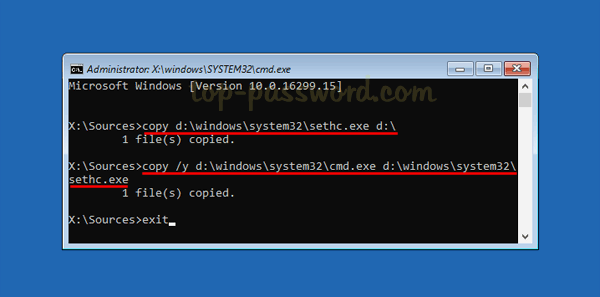
- Once that's finished, restart the computer and remove the install deejay.
-
Subsequently you come across the logon screen, press the SHIFT primal five times. Voila! The Command Prompt opens and yous can run the following commands to create a new admin account.
net user {user_name} /add net localgroup administrators {user_name} /add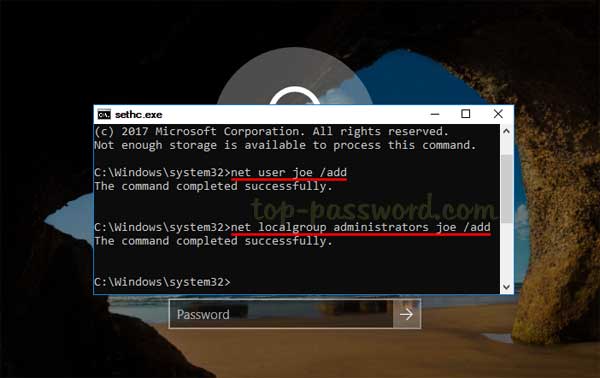
- Reboot and you tin can then log in to your Windows calculator with the new admin account.
Method ii: Turn on Automatic Login
Every time you boot your computer, information technology volition stop at the login screen, waiting for you to enter (or click on) your login name and enter your password. If you're the sole user of your PC, typing your user password becomes a pure waste of time. Here'south how to configure your calculator to automatically bypass Windows login screen, without removing or clearing your current countersign.
-
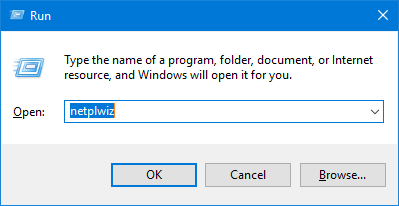
Press the Windows key + R to launch the Run command box. Type netplwiz and hit Enter.
-
In the User Accounts dialog box, select the user you lot desire to automatically log in to, and uncheck the option "Users must enter a user proper name and a password to utilize this computer". Click OK.

-
Type the password of your chosen account and confirm it.
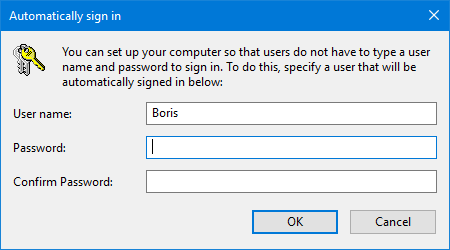
- The next fourth dimension you start Windows, information technology will bypass the login screen and automatically logged in with the user you just selected.
Method 3: Bypass Windows Password with PCUnlocker
Besides resetting Windows user countersign, PCUnlocker too allows you to featherbed Windows countersign through temporarily changing the Windows kernel on the fly. The password bypass procedure doesn't overwrite your old password and make any permanent changes to your files.
- Download PCUnlocker on a reckoner that you can admission. Extract contents of the zero file to the desktop. Y'all will see the ISO file in the extracted files. Next, use the ISO2Disc tool to put the ISO file either on a CD or USB flash drive and make it bootable.
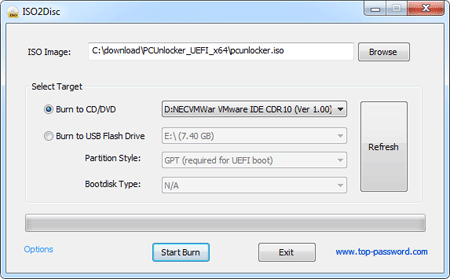
- Insert the CD or USB drive into your locked estimator and kick from it. Make sure you alter the boot priority within the BIOS and so the CD/USB drive is the starting time boot option.
-
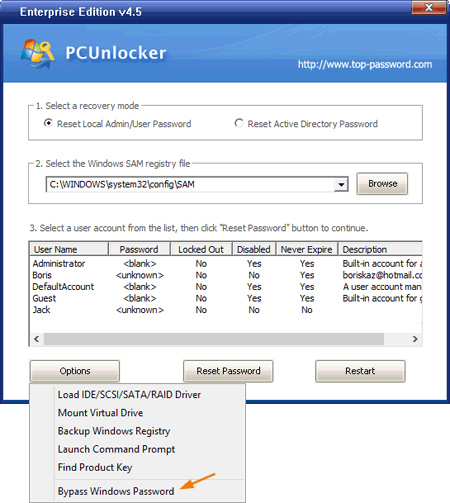
Once the PCUnlocker screen appears, choose the SAM registry for the Windows installation yous want to get into. And so click on the Options button and select Featherbed Windows Password.
-
Now the password featherbed is ready, click OK to ostend and begin.
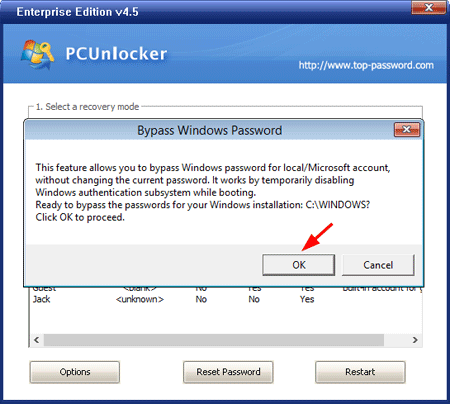
-
Click OK and reboot the computer. Remove the CD/USB drive so the computer won't boot to PCUnlocker again.
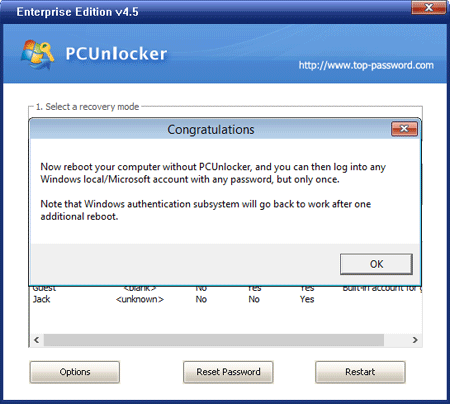
- When you come to the login screen, y'all tin log in to any Windows account past entering any password. Considering the above procedure doesn't change the SAM database, you lot will again be prompted to enter your old password if you reboot once again without using PCUnlocker.
Related Articles

Source: https://www.top-password.com/guide/bypass-windows-password.html
Posted by: stevenshicupok.blogspot.com
0 Response to "How To Get Past A Administrator Password Windows 10"
Post a Comment